

Why Are Your Pages Not Showing on Google? 12 Common Reasons and How to Fix Them
Common reasons your pages don’t appear on Google, and practical steps to find and fix the problem.
Read articleUnderstand why your website is losing Google traffic, identify the real causes, and discover practical ways to recover your organic search visibility.
When you notice a sudden decline in traffic coming from Google, your first thought may be that a Google algorithm update has affected your website or that something has changed across search results.
These concerns become even more common when other website owners report similar traffic losses around the same time.
But does a decline in traffic across multiple websites automatically mean Google is experiencing a problem?
Not necessarily.
Two websites can lose traffic during the same period for completely different reasons. One may have lost rankings for important keywords, another may be experiencing lower search demand, while a third may have technical issues affecting crawling, indexing, or traffic measurement.
That is why a decline in organic traffic should never be treated as a single problem with one universal solution.
The right approach is to identify where the decline is happening, understand which performance metrics have changed, and investigate the possible causes using reliable data.
In this guide, SEO Alawael explains how to diagnose a decline in organic traffic, analyze Google Search Console data, distinguish between Google-related changes and website-specific problems, and determine the appropriate recovery actions.
Before investigating the cause, you need to understand the scope of the problem.
There is a significant difference between a decline affecting one website, a group of websites in the same industry, and a broader reduction in search demand.
If the traffic loss is limited to your website, start by examining its internal performance data.
Possible causes include:
In this situation, there is no reason to assume that Google has changed how it ranks all websites.
If several competing websites experience a decline during the same period, the pattern deserves investigation.
However, it does not automatically prove that Google has introduced a broad search problem or ranking change.
For a meaningful comparison, the websites should be similar in terms of:
A shared decline could be associated with changes in search demand, search result layouts, or Google’s ranking systems.
Sometimes, the problem is not your website’s rankings. It is the number of people searching for the topics you cover.
For example, interest in a seasonal service may decline after its peak season, or demand for a product may decrease as alternatives become more popular.
Google Trends can help you investigate whether interest in particular topics has changed over time.
One of the most common SEO analysis mistakes is treating every traffic decline as the same type of problem.
Google Search Console provides several performance metrics that should be examined together:
Looking at clicks alone is not enough to identify the cause of a decline.
| Performance change | Possible explanation | What to investigate |
|---|---|---|
| Impressions and clicks both decline | Lower visibility, reduced demand, or indexing issues | Queries, pages, and indexing |
| Clicks decline while impressions remain stable | Lower CTR or changes in search result layouts | Titles, snippets, and SERP features |
| Average position declines | Ranking changes or increased competition | Affected queries and pages |
| Analytics traffic declines while Search Console clicks remain stable | Measurement or tracking issues | GA4 and traffic attribution |
| Only specific pages lose traffic | Page-level content or technical problems | Individual URL performance |
These patterns help guide your investigation, but they do not prove the cause on their own.
Imagine a page that previously received 10,000 impressions and 500 clicks. Later, it receives the same 10,000 impressions but only 300 clicks.
In this case:
The page is still appearing in search results, but fewer users are choosing to visit it.
Possible explanations include:
This situation requires a different response from a page that has lost most of its search impressions.
Google Search Console is one of the most important starting points for investigating organic search performance.
It provides data about clicks, impressions, queries, pages, devices, and countries.
However, the value comes from knowing how to interpret the reports, not simply opening the dashboard and noticing a downward trend.
Avoid comparing only the most recent week with the previous week and immediately concluding that your website has a serious SEO problem.
Traffic can fluctuate because of seasonality, weekly search behavior, and changes in user demand.
Review a suitable date range and use the available historical data, including up to 16 months of Search Console performance data when available.
Compare:
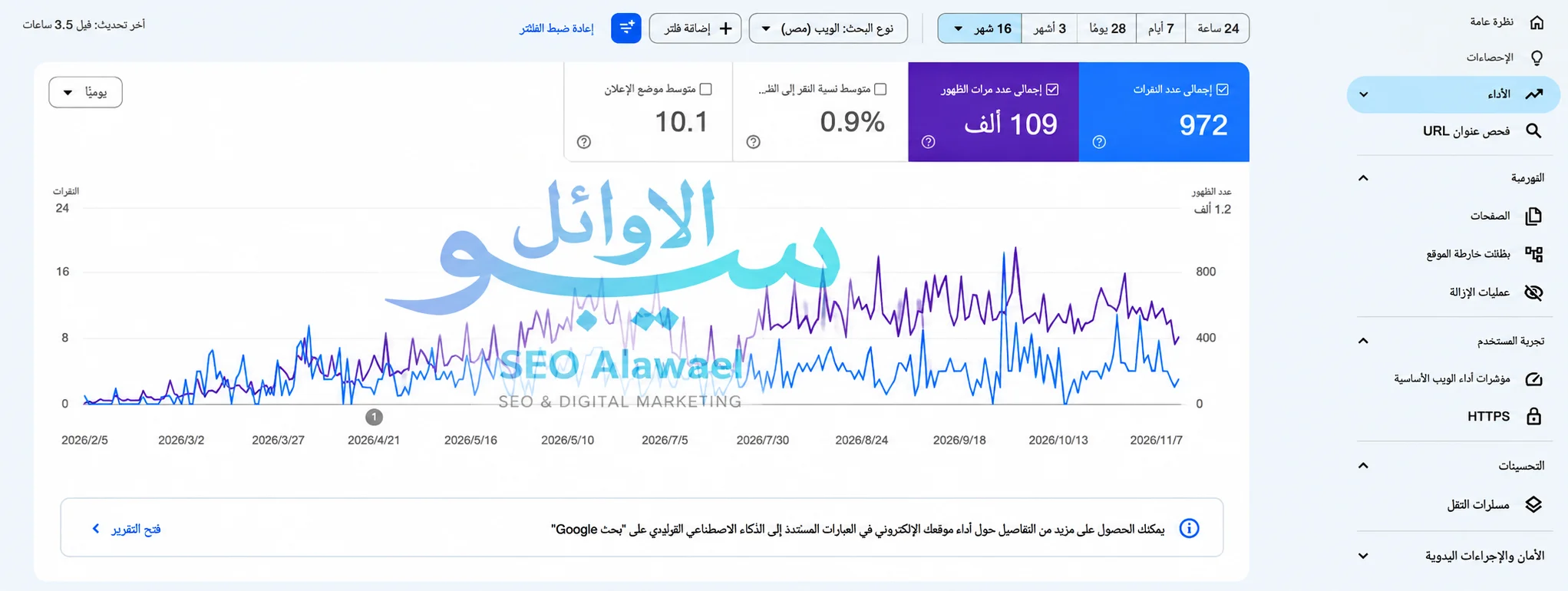
Open the Performance report and use the comparison option to select the periods you want to analyze.
For example, compare the latest three months with the previous three months, or compare the same months across different years.
Do not focus only on total clicks and impressions. Review the changes shown in the report’s tables as well.
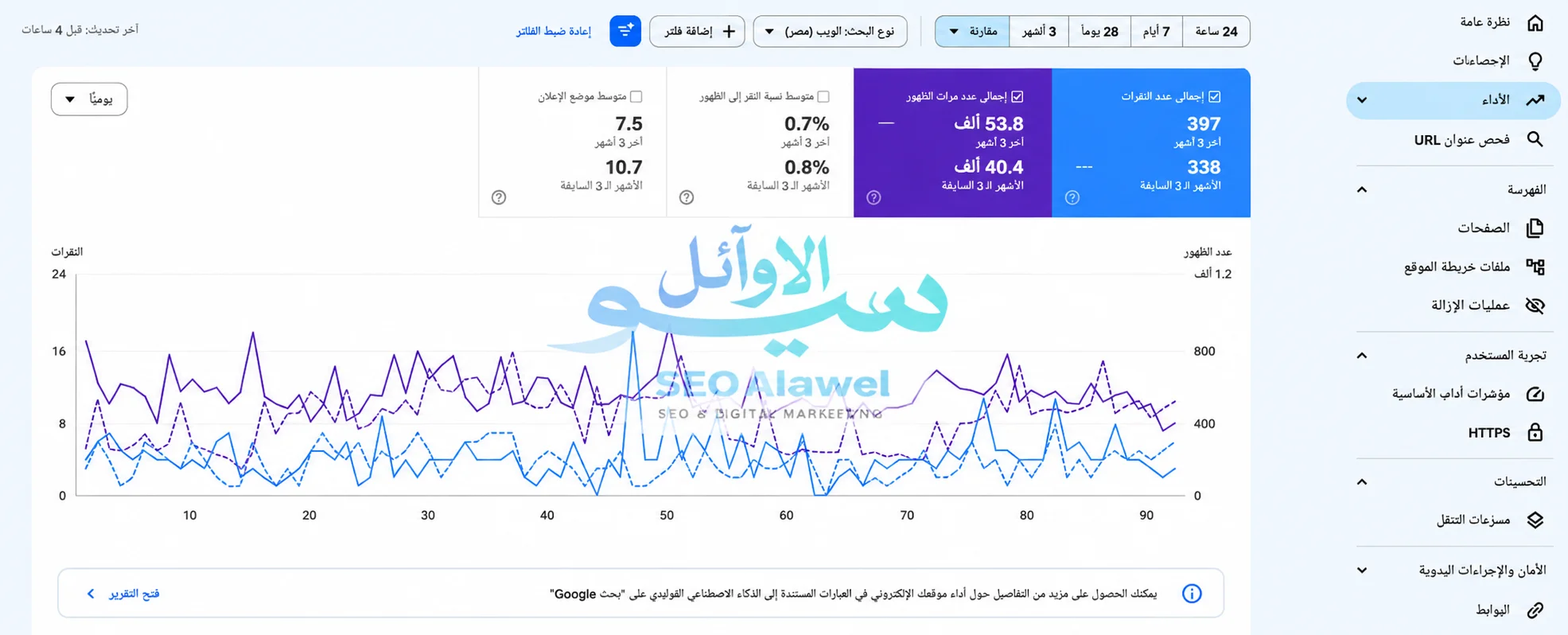
Open the Pages tab and compare the click differences between the selected periods.
This helps you determine whether the decline is:
If only certain pages are affected, do not start changing the entire website.
Investigate those pages first.
Open the Queries tab and identify the search terms that experienced the largest declines in clicks or impressions.
Ask the following questions:
This analysis helps distinguish between ranking losses and changes in search demand.
A traffic decline may be limited to a particular market or device.
For example:
Review the Country, Device, and Search Type dimensions rather than relying only on the website’s total performance.
Google continuously updates its search systems and periodically announces broad core updates.
These changes can affect the rankings of individual pages and websites.
However, a traffic decline occurring around the same time as an announced update does not automatically prove that the update caused it.
Google recommends waiting at least one full week after a core update has completed before evaluating its impact, while using appropriate comparison periods.
Not necessarily.
Google’s ranking systems evolve continuously, and search results can change as different pages become more relevant to users’ needs.
If the decline is relatively small, avoid making drastic changes to pages that are performing well simply because of temporary fluctuations.
If the decline is significant and sustained, review the website’s overall quality, usefulness, and how well its content meets search intent.
Your content may be useful, and search demand may remain stable, yet your website can still lose organic visibility because of technical problems.
These issues may prevent Google from accessing, crawling, indexing, or displaying important pages.
Check whether your important pages are still indexed.
Review:
Not every excluded page represents a problem. Some exclusions are intentional and completely normal.
Repeated server errors or website outages may affect Google’s ability to access your pages.
Review server logs, Crawl Stats, and any response errors affecting important URLs.
Changing page URLs or migrating a website without proper redirects can lead to lost traffic and other SEO complications.
Check:
Review the Security Issues and Manual Actions reports in Google Search Console.
Security problems or manual actions may affect how your website appears in Google Search.
However, the absence of a manual action does not mean that no other issue exists. Algorithmic changes and technical problems can occur without a manual action notification.
It is important to distinguish between a decline in website rankings and a decline in demand for the topics your website covers.
A website may maintain approximately the same average position but receive fewer clicks because fewer people are searching for the relevant topics.
For example, interest in one service may decline during a particular season while searches for a related service increase.
Keep in mind that Google Trends does not provide exact search volume. It displays relative, normalized search interest according to its own methodology.
Suggested image: A genuine Google Trends screenshot comparing three related topics over a five-year period.
Your website may not have technical problems or a confirmed Google update impact. However, competing websites may now provide more relevant answers to users.
In this situation, you need to analyze the current Search Engine Results Pages (SERPs) and compare the pages ranking today with the content that has lost visibility.
Review:
A competitor’s article is not automatically better simply because it is longer.
The important question is what useful information it provides that your page does not.
Compare your page with the competing pages currently ranking for your target queries.
Identify:
Then improve your page to deliver genuine value rather than simply adding more keywords or copying competitors’ headings.
You may notice a decline in Google Analytics 4 traffic while Search Console does not show a similar drop.
This difference deserves investigation before you decide to rewrite content or change your SEO strategy.
Search Console measures your website’s performance in Google Search, including search impressions and clicks, according to its reporting rules.
Google Analytics 4 measures user interactions and sessions on your website after visitors arrive, based on its tracking configuration.
Review the following:
If Organic Search sessions decline in GA4 while Search Console clicks remain relatively stable, do not immediately assume that your rankings have dropped.
The issue may involve analytics measurement or the experience users encounter after clicking through to your website.
To understand why different situations require different responses, consider these three hypothetical examples.
Imagine a website that previously received 100,000 monthly impressions but now receives only 60,000, with clicks declining at the same time.
Investigate:
You cannot conclude that an algorithm update caused the decline without additional evidence.
If impressions remain close to their previous level while clicks decrease, start by investigating CTR.
Review page titles, meta descriptions, SERP features, and competition for important queries.
The issue may involve how your search result attracts clicks or changes in the search results layout rather than an indexing problem.
If several websites in the same industry experience a decline during the same period, investigate multiple possibilities:
Collect comparable data before concluding that a common cause exists.
Once you identify the likely cause, create a recovery plan that addresses the actual problem.
| Identified problem | Recommended action |
|---|---|
| Indexing decline | Investigate exclusion reasons and fix genuine issues |
| Ranking losses on important pages | Review content, search intent, and competitors |
| Lower CTR | Improve titles, descriptions, and search-result presentation |
| Seasonal demand decline | Adjust traffic expectations and content planning |
| Technical problems | Fix crawling, response, and redirect issues |
| Weak or outdated content | Add useful information, practical experience, and relevant examples |
| Analytics measurement issues | Review GA4 and tracking configuration |
| Traffic decline after migration | Audit redirects, URLs, indexing, and internal links |
Some actions can make an existing problem worse:
Every action should address an identified problem, and its impact should be monitored after implementation.
Use this checklist before making major changes to your website:
Confirm that the decline is real and not a measurement issue.
Identify when the decline started.
Compare the current period with previous and year-over-year periods.
Review clicks, impressions, CTR, and average position.
Identify the pages most affected.
Identify queries that lost impressions and clicks.
Compare devices, countries, and search types.
Review indexing and crawling reports.
Check manual actions and security issues.
Review announced Google updates.
Investigate seasonal demand using Google Trends.
Compare current search results with competitors.
Identify the likely cause and assess the supporting evidence.
Create a recovery plan and monitor its results.
A sudden decline may be caused by changes in Google’s ranking systems, technical problems, lost rankings, reduced keyword demand, or changes in search result layouts. Review Google Search Console data to identify where the decline occurred before deciding what caused it.
No. Some pages and websites may benefit from changes in Google’s ranking systems, while others may lose visibility or remain relatively stable. Analyze your website’s performance before and after an update instead of assuming that every update causes traffic losses.
Compare the date your traffic decline began with the dates of announced updates. Allow the update to finish, then review the affected pages and queries in Search Console. Timing alone does not prove a causal connection.
Not necessarily. Clicks can decline while impressions remain stable because of a lower CTR or changes in search result layouts. Review all relevant performance metrics together.
Recovery time depends on the cause, the type of changes made, crawling and indexing processes, and how search systems reassess the affected pages. Some changes may show results within days, while others can take weeks or months. There is no guaranteed recovery timeframe.
No. Lack of traffic alone is not a sufficient reason to delete a page. Review its usefulness, topical role, accuracy, improvement opportunities, and whether similar pages overlap or compete with it.
Not necessarily. Observing a decline across a limited number of websites does not establish a general Google problem. You need comparable data from websites operating in similar industries, markets, and search environments.
Organic traffic refers to visits from unpaid search results. Total website traffic includes multiple sources, such as organic search, paid advertising, referrals, social media, and direct visits. Identify the affected channel before investigating the decline.
A decline in Google traffic does not automatically mean your website has a problem. Likewise, a decline across several websites does not necessarily prove that Google has introduced a broad search issue.
A reliable investigation begins by identifying the type of decline, reviewing impressions and clicks, examining affected pages and queries, and testing possible technical, editorial, competitive, and seasonal causes.
At SEO Alawael, we approach search engine optimization as an ongoing process of analysis and improvement, not simply a matter of changing keywords or making random adjustments after traffic declines.
If your website has experienced a decline in organic performance and you are unsure what caused it, contact SEO Alawael to discuss your website and identify an appropriate analysis and improvement strategy.
Common reasons your pages don’t appear on Google, and practical steps to find and fix the problem.
Read articleSend us your website link and tell us about your business and target market — we will map out the right next step with you.